It turns out GPU overclocking under Linux may not be easy peasy.
Objective
The goal is to be able to overclock GPU without any displays attached.
After installation of nvidia card and proper drivers under linux system the overclock functionality is disabled by default.
To overcome this limitation few steps are required, but when attached card has no displays attached it gets a little bit more complicated.
My setup
I have three NVIDIA GPUs installed on my mobo:
- GTX 1650S
- RTX 3070
- RTX 3060 Ti
1650S is used just as display output (HDMI, DP ports used)
3070 and 3060 Ti for CUDA calculations
To increase performance I wanted to overclock 3070 and 3060 Ti, but it forced me to learn few more things in Linux.
Solution
Here is my configuration file (/etc/X11/xorg.conf.d/10-nvidia.conf)
Section "ServerLayout"
    Identifier     "Layout0"
    Screen      0  "Screen0" 0 0
    Screen      1  "Screen1" 0 0
    Screen      2  "Screen2" 0 0
    InputDevice    "Keyboard0" "CoreKeyboard"
    InputDevice    "Mouse0" "CorePointer"
    Option         "Xinerama" "0"
EndSection

Section "InputDevice"
    # generated from default
    Identifier     "Mouse0"
    Driver         "mouse"
    Option         "Protocol" "auto"
    Option         "Device" "/dev/input/mice"
    Option         "Emulate3Buttons" "no"
    Option         "ZAxisMapping" "4 5"
EndSection

Section "InputDevice"
    # generated from default
    Identifier     "Keyboard0"
    Driver         "kbd"
EndSection

Section "Monitor"
    # HorizSync source: edid, VertRefresh source: edid
    Identifier     "Monitor0"
    VendorName     "Unknown"
    ModelName      "Idek Iiyama PLX2380H"
    HorizSync       30.0 - 83.0
    VertRefresh     55.0 - 76.0
    Option         "DPMS"
EndSection

Section "Device"
    Identifier     "Device0"
    Driver         "nvidia"
    VendorName     "NVIDIA Corporation"
    BoardName      "GeForce GTX 1650 SUPER"
    BusID          "PCI:11:0:0"
EndSection

Section "Screen"
    Identifier     "Screen0"
    Device         "Device0"
    Monitor        "Monitor0"
    DefaultDepth    24
    Option         "Stereo" "0"
    Option         "nvidiaXineramaInfoOrder" "DFP-2"
    Option         "metamodes" "HDMI-0: nvidia-auto-select +2560+0, DP-0: nvidia-auto-select +0+0"
    Option         "SLI" "Off"
    Option         "MultiGPU" "Off"
    Option         "BaseMosaic" "off"
    Option         "Coolbits" "28"
    SubSection     "Display"
        Depth       24
    EndSubSection
EndSection

#########################3060################################################
Section "Monitor"
    Identifier     "Monitor1"
    VendorName     "Unknown"
    ModelName      "Unknown"
    Option         "DPMS"
    Option         "CustomEDID" "DFP-0:/etc/X11/edid.bin"
EndSection

Section "Device"
    Identifier     "Device1"
    Driver         "nvidia"
    VendorName     "NVIDIA Corporation"
    BoardName      "GeForce RTX 3060"
    BusID          "PCI:10:0:0"
    Option         "Coolbits" "28"
EndSection

#screen for 3070
Section "Screen"
    Identifier     "Screen1"
    Device         "Device1"
    Monitor        "Monitor1"
    Option         "UseDisplayDevice" "DFP-0"
    Option         "ConnectedMonitor" "DFP-0"
    DefaultDepth    24
    Option         "Coolbits" "28"
    SubSection     "Display"
        Viewport 0 0
        Depth       24
    EndSubSection
EndSection


###########################3070##############################################
Section "Monitor"
    Identifier     "Monitor2"
    VendorName     "Unknown"
    ModelName      "Unknown"
    Option         "DPMS"
    Option         "CustomEDID" "DFP-0:/etc/X11/edid.bin"
EndSection

Section "Device"
    Identifier     "Device2"
    Driver         "nvidia"
    VendorName     "NVIDIA Corporation"
    BoardName      "GeForce RTX 3070"
    BusID          "PCI:4:0:0"
    Option         "Coolbits" "28"
EndSection

#screen for 3070
Section "Screen"
    Identifier     "Screen2"
    Device         "Device2"
    Monitor        "Monitor2"
    Option         "UseDisplayDevice" "DFP-0"
    Option         "ConnectedMonitor" "DFP-0"
    DefaultDepth    24
    Option         "Coolbits" "28"
    SubSection     "Display"
        Viewport 0 0
        Depth       24
    EndSubSection
EndSection
Description
First thing you need to do is to configure Dummy monitor for the card.
To do so we need EDID of some screen.
The easiest way is to export it from already attached display.
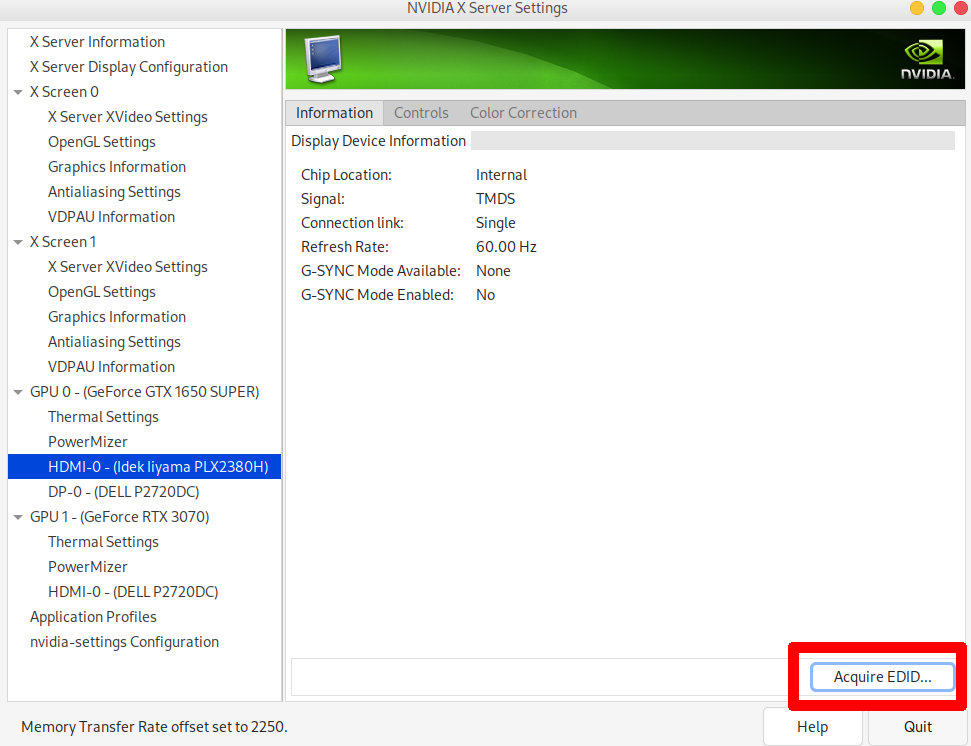
EDITIt is reflected in the section:
#Dummy monitor
Section "Monitor"
    Identifier     "Monitor1"
    VendorName     "Unknown"
    ModelName      "Unknown"
    Option         "DPMS"
    Option         "CustomEDID" "DFP-0:/etc/X11/edid.bin"
EndSection
Then we need to create Device section for our card where in BusId we specify port where card is attached.
The last section is Screen which connects Device and Screen.
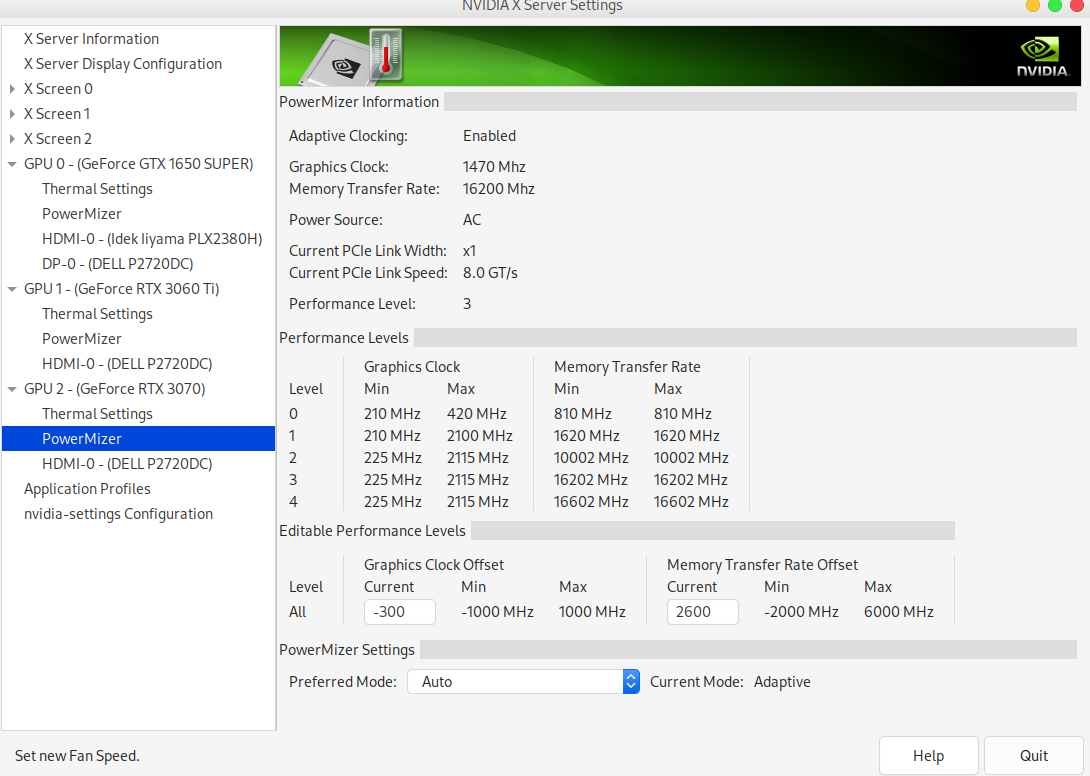
The crucial part is Option "Coolbits" "28" which turns on overclocking possibilities.
In the end we end up with:
Useful resources: